
 Get Chrome extension
How AI Web Form Autofill Works, and When to Use It

Filling the same details into web forms is one of those small tasks that quietly adds up across a working day. Your browser's built-in autofill helps with your own name and address on tidy forms, but it falls down the moment the data is someone else's, the source is a photo or a document, or the form's fields are named in ways nothing recognises.
This is an overview of how AI-based form autofill works, using FillWise, a Chrome extension we build. It's the general picture; the role-specific guides linked below go deeper for particular jobs.
How it differs from browser autofill
Browser autofill matches a field to a saved value using the field's type and name. It's built for your own stored profile and works when a form is labelled the way the browser expects. AI-based autofill is a different approach:
- The source can be anything. Not just your saved profile, but pasted text in any format, a photo of a document, or a PDF. The data can be about anyone: a client, a candidate, a traveler.
- Matching is by meaning. The AI reads each field's label, name, placeholder and type and works out what belongs there, so it handles forms where the field is called something unhelpful like
Text1. - It handles more than text boxes. Checkboxes, radio buttons, dropdowns and date fields are filled by their type, not just typed over.
The workflow
FillWise is a Chrome extension with a side panel. The pattern is the same whatever the form:
- Install FillWise from the Chrome Web Store and sign in with Google.
- Open the form you need in a Chrome tab.
- Open the side panel and give it your source: paste text in any format, or attach a photo, screenshot or PDF of the data.
- Click Fill form. The AI matches your data to the fields and enters the values.
- Review against the source and submit.
The free plan starts with 20 fills and then tops back up to 5 a week, no card required, so you can try it on your own forms first.
Try it on a sample form
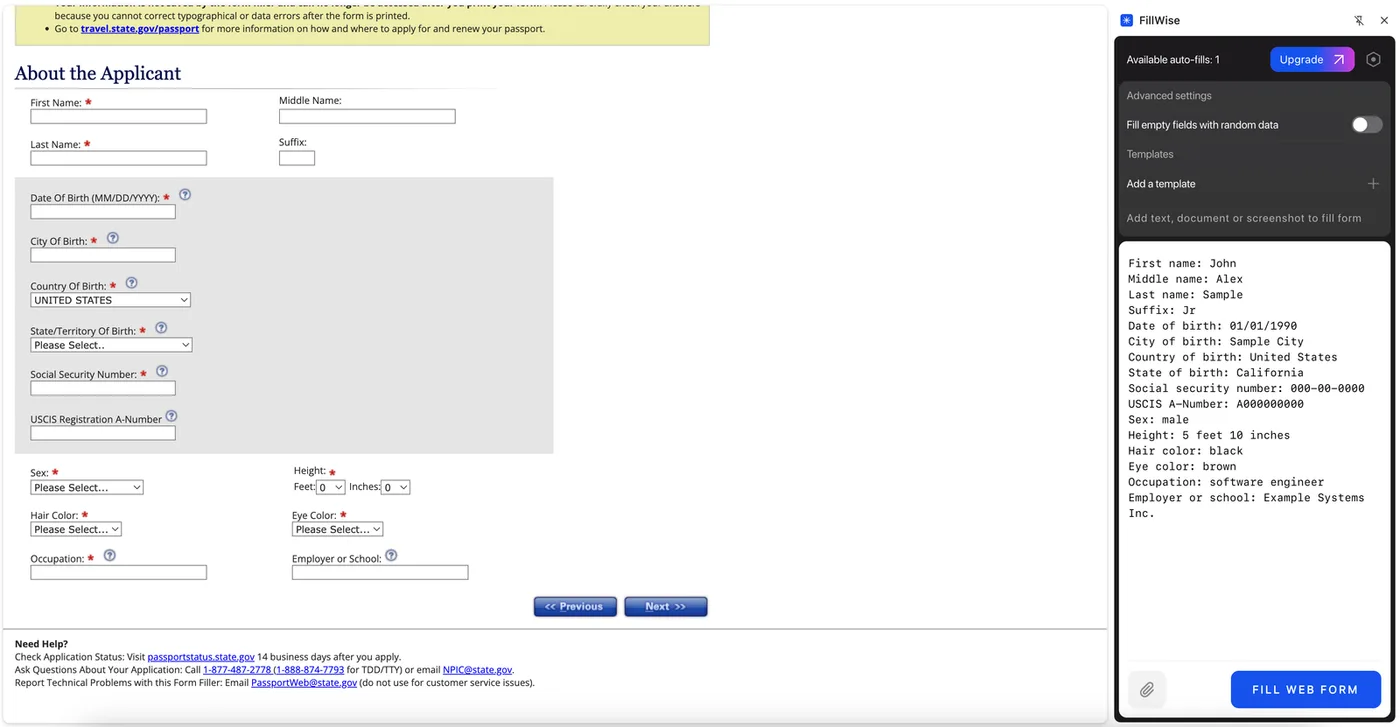
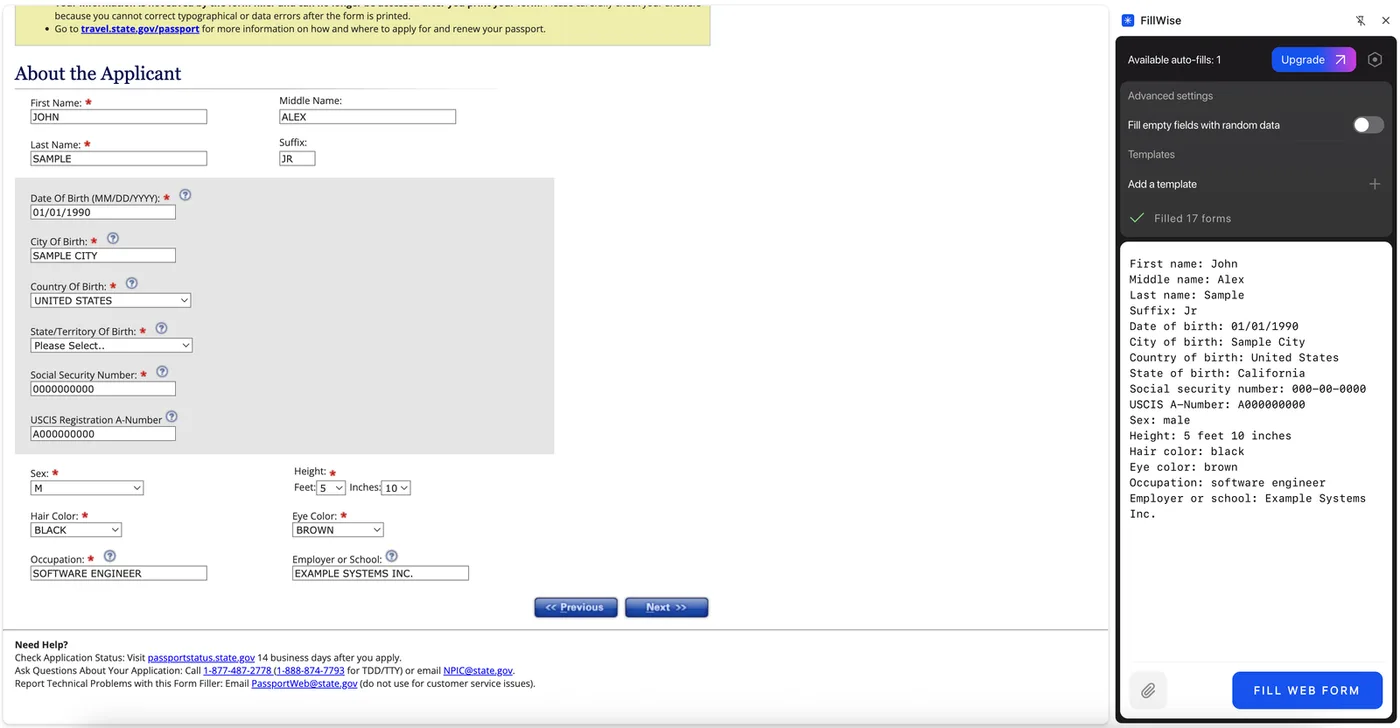
Below is the demo from our home page: a sample web form, with a block of text already pasted into a copy of the side panel. Press Fill form in the panel and watch the fields fill, then click any of them to check or change the value. The other cards switch to fillable PDFs, two USCIS forms.
What it handles
- Text fields get the value in the format the field expects, including dates converted to match the field.
- Checkboxes and radio buttons are set on or off, or to the one correct option.
- Dropdowns get one of the field's real options, chosen by meaning.
- Multiple languages. The source and the form can be in different languages; the AI reads documents in many languages and fills the form in the language it uses. Passports and IDs in non-Latin scripts are supported.
- Messy field names. Because matching uses labels and context, forms with unhelpful internal field names still fill correctly.
Where to go deeper
The workflow is the same, but the source data and the forms differ by job. These guides cover the specifics:
- Travel agents: visa applications and booking portals from a passport photo.
- Recruiters and HR: resumes and profiles into ATS and job board forms.
- Sales teams: CRM records into qualification and outreach forms.
- Insurance agents: client documents into policy applications and ACORD forms.
- Event organizers: participant lists into registration forms.
- Spreadsheet data: rows into forms without copying cell by cell.
- PDF forms: filling fillable PDFs, and the difference from flat scans.
What it doesn't do
So expectations are right:
- It's not an integration with any specific system. No connector or API to configure. It fills whatever form is open in your browser, which is why it works across sites without setup.
- It doesn't scrape sites for you. It works from the source you give it, not by harvesting a page in the background.
- It doesn't submit for you. It fills the form; you review and submit. A filled form is a draft until you've read it.
- It doesn't type into PDFs that have no fields. A flat PDF or a scan has no form fields to put values into, so FillWise draws the values onto the page instead and opens them in an editor, where you can move or change them before saving. Check where they landed, especially on scans. See the flat PDF guide.
What to check by hand
Autofill removes the typing, not the responsibility. Read the filled values against your source before submitting, with extra attention to anything that's hard to reverse: emails and phone numbers, ID and reference numbers, dropdown selections, and required fields on forms with real consequences.
Privacy
Whatever you paste or attach is sent encrypted to our servers, read by the AI to produce the field values, and is not stored after processing. Nothing is sold or used to train models. Fillable PDFs are a special case: the document is parsed locally in your browser, and only the list of fields plus your source data is sent for matching. The specifics are in our privacy policy.
Pricing
The free plan starts with 20 fills and then tops back up to 5 a week, no card required. Paid plans are on the pricing page.
Try it on a form you fill often: install FillWise, open the form, and paste or attach your data. The free plan starts with 20 fills, no card required.