
 Get Chrome extension
How to Fill PDF Forms Automatically with AI

Visa application packets, insurance claims, onboarding paperwork, government forms. A surprising amount of official life still arrives as a PDF you're expected to fill out field by field. If the same names, dates and numbers keep going into different PDFs, that part of the job is transcription, and transcription can be automated.
This guide covers auto-filling PDFs with FillWise, a Chrome extension we build. It focuses on fillable PDFs, documents with real interactive form fields, because they behave differently from flat ones. Flat forms without any fields are handled too, through a separate mechanism described in the flat PDF guide.
First: is your PDF actually fillable?
PDF forms come in two kinds, and knowing which one you're holding saves you time regardless of what tool you use:
- Fillable (interactive) PDFs contain real form fields: text boxes, checkboxes, radio buttons, dropdowns. Open one in Chrome and click a field, and the cursor lands inside it so you can type. These are the forms this guide is about.
- Flat PDFs are just pictures of a form, usually scans or print layouts. Nothing happens when you click where a field should be. There is nothing to put a value into, so filling one means drawing text at the right place on the page. FillWise does that through a separate path, covered in the flat PDF guide.
Five-second test: open the PDF in Chrome and click on any blank line. If you get a text cursor inside a box, it's fillable.
The workflow
FillWise fills PDFs from the same side panel it uses for web forms. The difference is where the work happens: the PDF is parsed and filled locally in your browser, and the document itself is never uploaded anywhere.
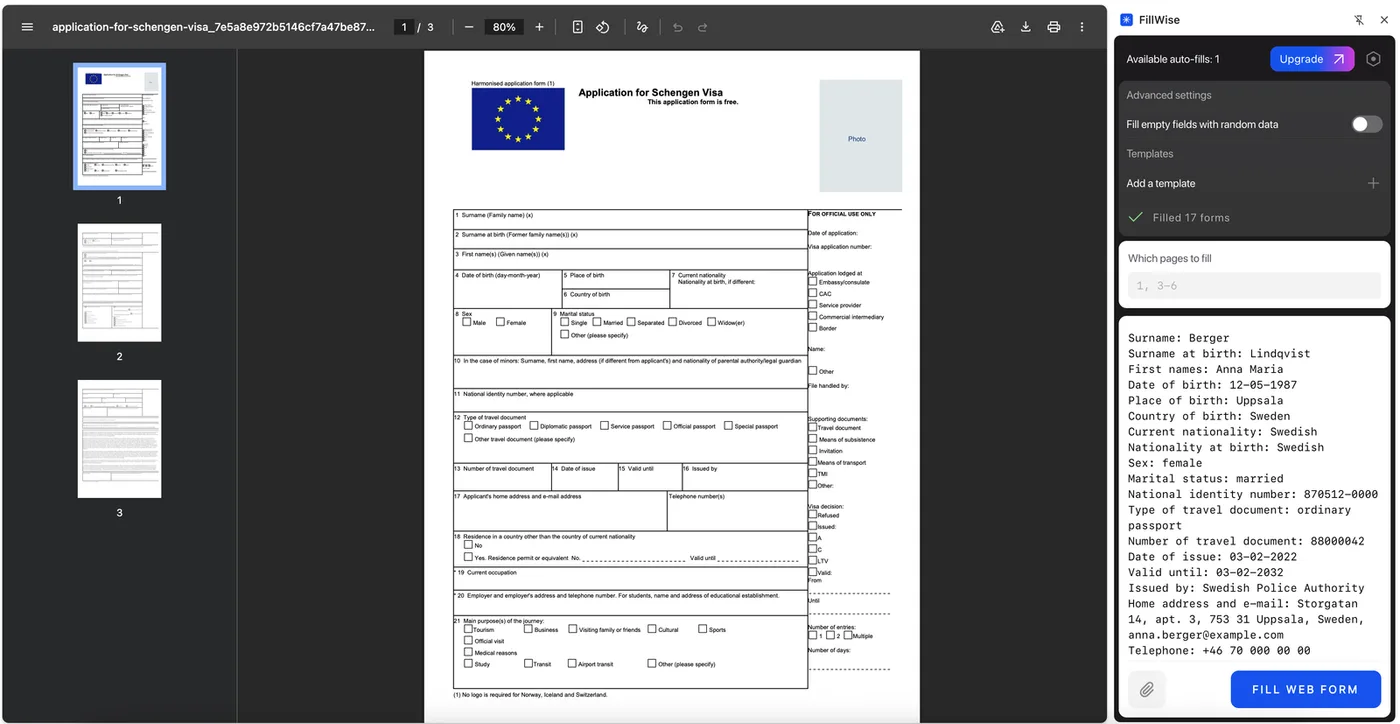
- Open the PDF in a Chrome tab. Not in Acrobat, not in Preview, just a regular Chrome tab.
- Open the FillWise side panel and give it your source data: paste text in any format (a CRM record, an email, "John Johnson, 01.01.2000, john@company.com…") and/or attach a photo or scan of a document, like a passport bio page.
- Click "Fill form". FillWise detects that the active tab is a PDF, reads its form fields, matches your data to them, and fills text fields, checkboxes, radio buttons and dropdowns.
- Download the completed PDF and review it before sending it anywhere.
There's no template to build and no field mapping to configure. The first PDF works the same as the hundredth.
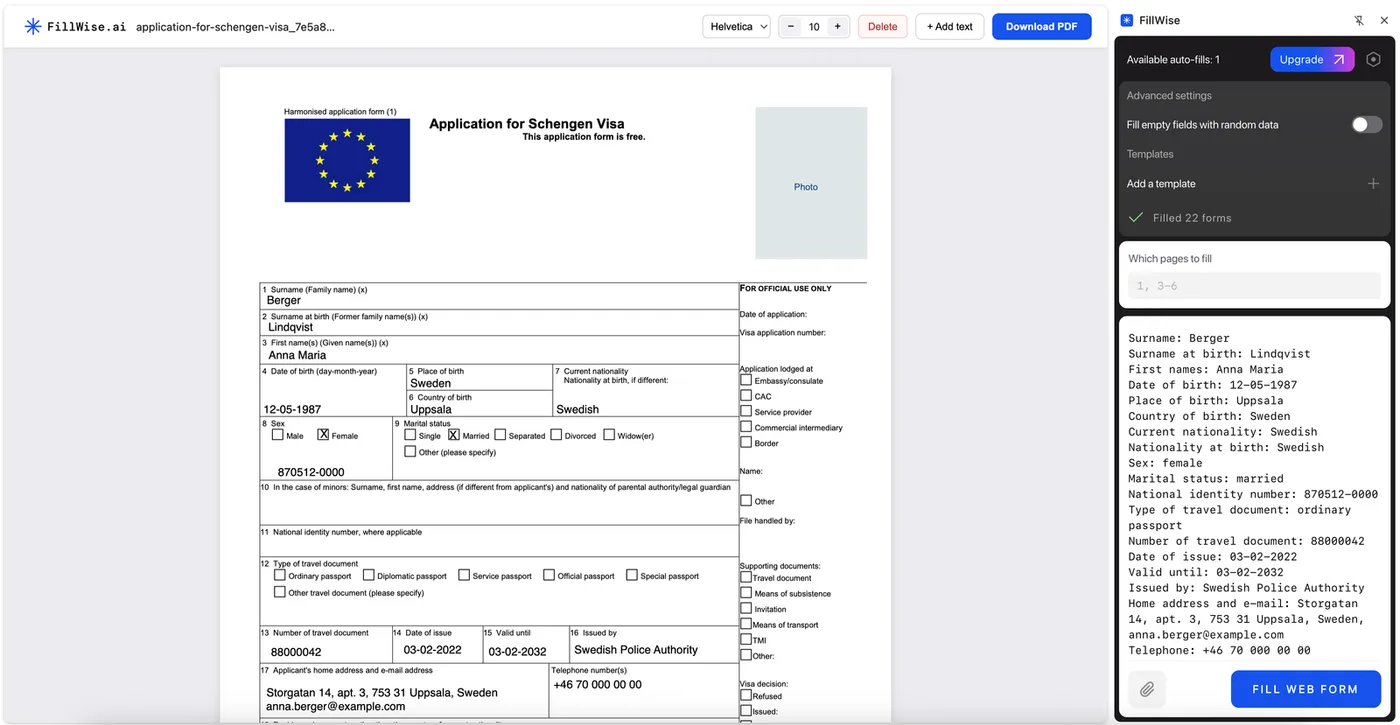
Try it on a real form
The demo below is the one from our home page, on two real USCIS forms. The side panel holds a few lines of sample text: press Fill form and watch the G-28 fill, text fields, checkboxes and dropdowns alike. Click any field to change its value, or switch to the 12-page I-130. The last card shows the same panel on an ordinary web form.
How it handles badly built PDFs
Here's a problem anyone who has automated PDFs knows: the internal field names inside real-world PDFs are often garbage. The field next to the label "Family name" might internally be called Text42. A tool that matches on field names alone fills those forms wrong or not at all.
FillWise doesn't rely on field names. It extracts the PDF's text layer and geometrically ties each visible caption to the field it sits next to, the same way a human reads the form. So the AI sees "Family name" where the form says "Family name," even if the field itself is called Text42. In practice this means messy, decades-old government and insurance PDFs fill just as well as tidy modern ones.
Field types are handled by their actual type, not just typed over:
- Text fields get the value in the format the field expects, including dates.
- Checkboxes are checked or left alone.
- Radio groups get exactly one option selected.
- Dropdowns get one of their real options. The AI picks from the list the PDF defines, so you don't end up with a value the form doesn't accept.
Where your document goes (and doesn't)
Worth stating precisely, because PDFs are often the sensitive stuff: IDs, medical, financial.
- The PDF is loaded and parsed inside your browser. The document file is not uploaded to our servers or anyone else's.
- What's sent for AI matching is the list of fields (their labels, types and options) plus the source data you provided. That's processed to produce the field values and is not stored afterwards.
- The filled PDF is assembled locally and saved to your downloads.
Details are in the privacy policy.
Typical scenarios
- Visa and immigration application PDFs: fill from a passport photo plus the client's travel details. Travel agencies are heavy users; there's a dedicated guide for travel agents.
- Insurance claims and applications: client record in, completed claim form out.
- HR onboarding packets: the same new-hire data across tax, benefits and policy acknowledgment forms.
- Recurring business forms: vendor registrations, credit applications, compliance questionnaires that ask for the same company details every time.
A batching tip: when several PDFs need the same data, keep the side panel open with your source pasted once, and go tab by tab. The panel doesn't reset between fills.
What to check before sending
Same rule as with any autofill: the tool removes the typing, you keep the responsibility.
- Read every filled field against your source, especially dates and ID numbers.
- Check fields the form expects you to decide, not copy: signatures, declarations, option choices that depend on the case.
- If the form has strict format notes ("as in passport", "DD/MM/YYYY"), verify those fields explicitly.
Pricing
The free plan starts with 20 fills and then tops back up to 5 a week, with no card required, enough to run your actual PDF through it and judge the result yourself. Paid plans are listed on the pricing page.
FAQ
My PDF has no fillable fields. Can FillWise fill it anyway? Yes, through a different mechanism: it reads the printed labels and blank lines from the document itself and draws the values onto them. The details and limits are in the flat PDF guide.
What about scanned paper forms? A scan with no text layer is the hardest case: there are no labels or blanks to read, so placement is estimated from the page image and needs checking. A scan also works well as a source: attach a scanned document as the data input, and FillWise reads it to fill a different form.
What about forms that only open in Adobe Reader? Some government forms, Canada's IRCC visa forms among them, are built with Adobe's XFA technology: any other viewer shows only a "Please wait..." page. The extension fills them too. It writes the answers into the form's own data, and you open the result in Adobe Reader to check it. Two side effects: the issuer's certification signature is removed, and after that the free Adobe Reader no longer saves edits you type by hand (Acrobat does). The account page and the API don't take these forms yet.
Does this work on Mac / Windows / Linux? It's a Chrome extension, so anywhere desktop Chrome runs.
Can it fill checkboxes and dropdowns, or only text? All of them: text fields, checkboxes, radio groups and dropdowns, each set through the PDF's real form machinery so the output opens correctly in any reader.
Try it on the PDF you actually have to fill this week: install FillWise, open the PDF in a Chrome tab, and paste your data. The free plan starts with 20 fills, no card required.